
Buying Guide | Panduan Membeli |购买指南
Step by step to learn how to buy poppers from MYRushpoppers
Step 1
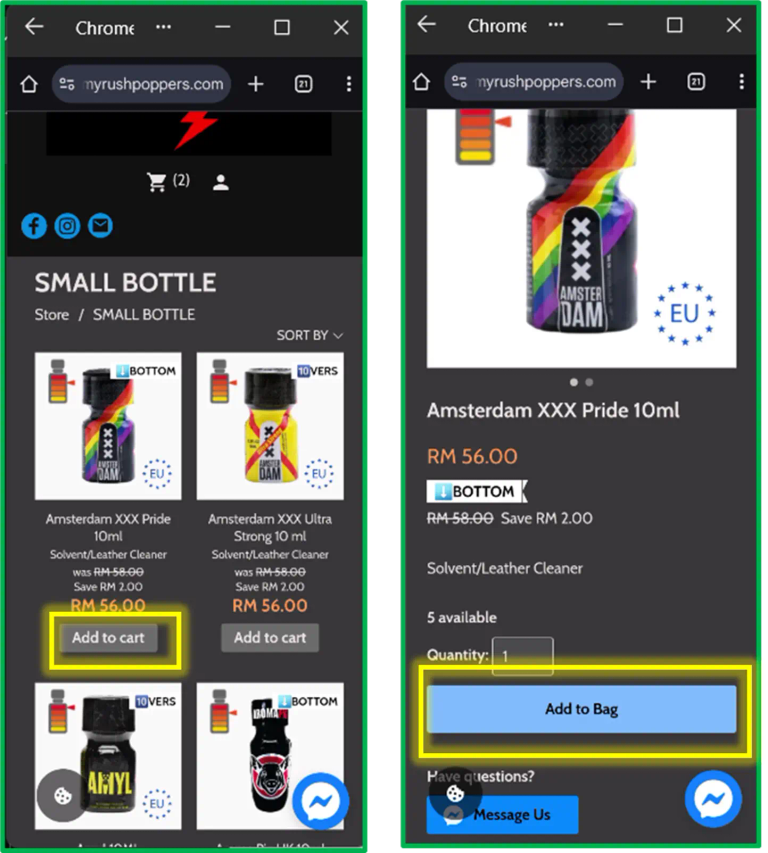
Select the product you want and click “Add to Cart” or “Add to Bag” .
Pilih produk yang anda mahukan dan klik “Add to Cart” atau “Add to Bag” .
选择您想购买的产品,然后点击 “Add to Cart” 或 “Add to Bag".
Step 2
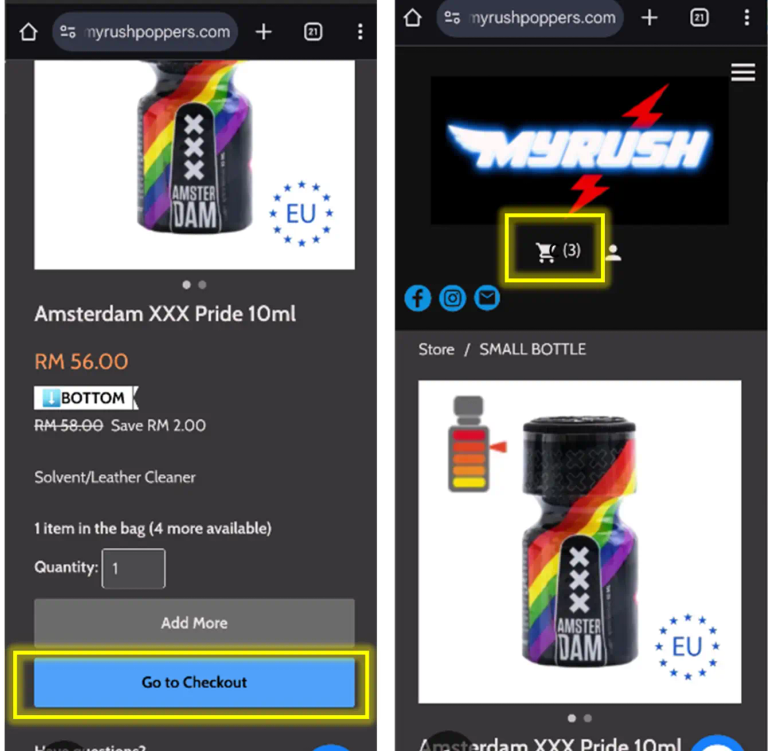
Click “Go to Checkout” or click the Shopping Cart icon to start the checkout process.
Klik “Go to Checkout” atau ikon Troli Belanja untuk meneruskan ke pembayaran.
点击 “Go to Checkout” 或购物车图标以开始结账流程。
Step 3
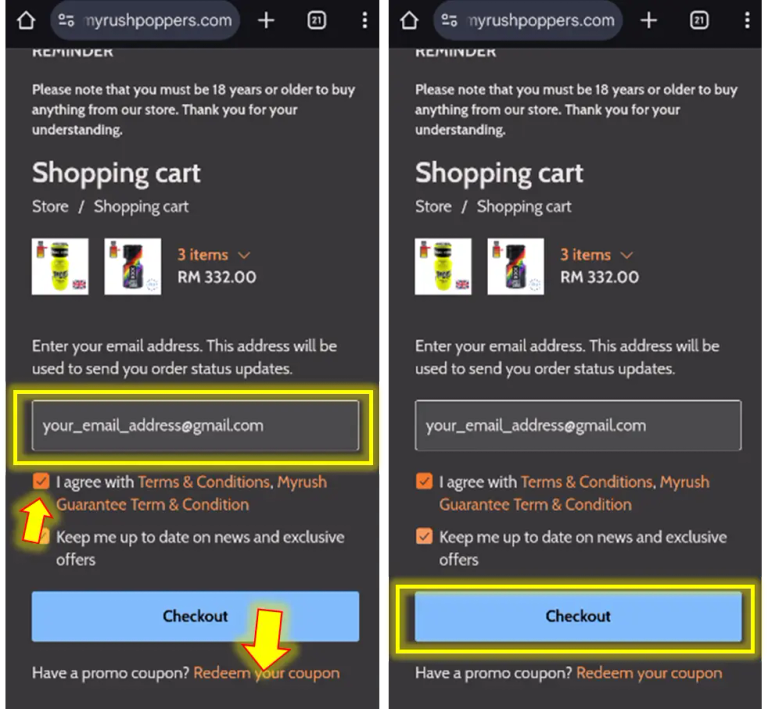
On the checkout page, enter a valid email address — this will be used for payment instructions and to send your parcel’s tracking number. Then tick “I agree with the terms and conditions.” If you have a discount coupon, click “Redeem Coupon” below the checkout button. Click “Checkout” to continue.
Di halaman pembayaran, masukkan alamat emel yang sah — ini akan digunakan untuk arahan pembayaran dan penghantaran nombor penjejakan bungkusan anda.Kemudian tandakan “I agree with the terms and conditions.”Jika anda mempunyai kupon diskaun, klik “Redeem Coupon” di bawah butang pembayaran.Klik “Checkout” untuk meneruskan.
在结账页面输入有效的电子邮件地址 — 我们将使用该邮箱发送付款说明和包裹追踪号码.然后勾选 “I agree with the terms and conditions.” 如果您有优惠券,请点击结账按钮下的 “Redeem Coupon.”点击 “Checkout” 继续。
Step 4
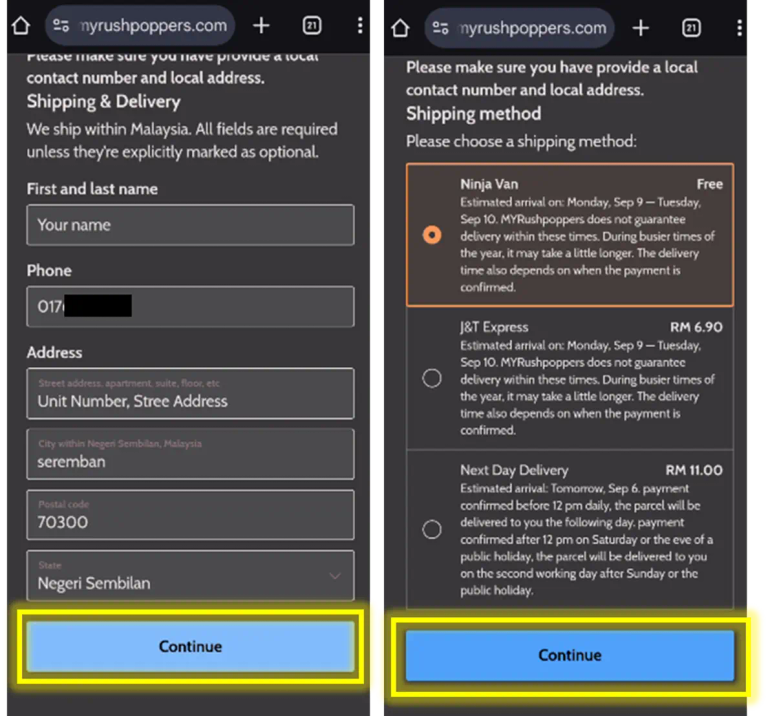
Fill in your personal details and click “Continue.” Choose your delivery method on the next screen and then click “Continue” again.
Isi maklumat anda dan klik “Continue”Pilih kaedah penghantaran pada skrin seterusnya dan klik “Continue” lagi.
填写您的个人资料,然后点击 “Continue”. 在下一步选择您的配送方式,然后再次点击 “Continue.”
Step 5
Select your preferred payment method and click “Place Order.” After placing your order successfully, the bank details or QR code for payment will be sent to your registered email.
Pilih kaedah pembayaran pilihan anda dan klik “Place Order". Selepas pesanan berjaya dibuat, butiran bank atau kod QR untuk pembayaran akan dihantar ke emel anda.
选择您偏好的付款方式并点击 “Place Order”. 订单成功提交后,付款所需的银行信息或二维码将发送到您的注册邮箱.如果你没有收到相关邮件,请检查你邮箱里的垃圾邮件并把它标识为非垃圾邮件
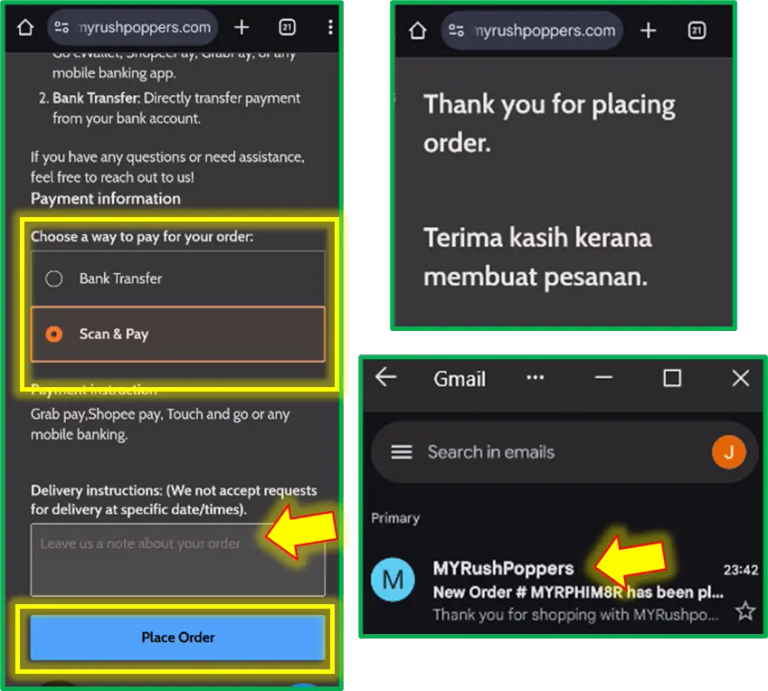
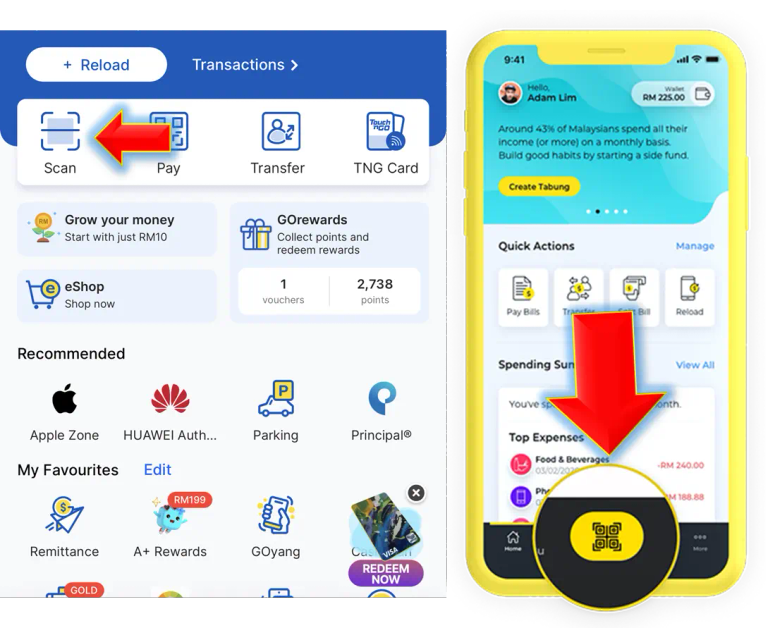
Scan & Pay
For QR code payment, open your banking or eWallet app and scan the QR code from the email. For detailed payment instructions, please refer to How to Pay:
👉 How to Pay
Untuk pembayaran kod QR, buka aplikasi bank atau eDompet anda dan imbas kod QR dalam emel. Untuk panduan pembayaran yang lengkap, sila rujuk Cara Pembayaran:
👉Cara Membayar
针对 二维码付款, 请打开您的银行或电子钱包应用并扫描邮件中的二维码。如需查看详细付款说明,请参考 付款方式说明:
👉如何付款
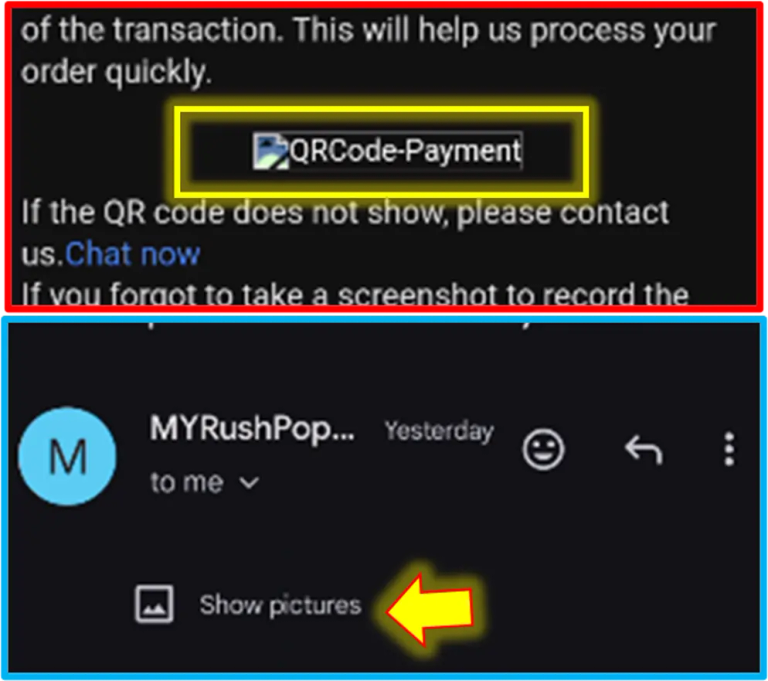
QR Code does not Show?
If the QR code doesn’t display, check if there is a “Show pictures” button at the top of the email. Click it to reveal the QR code. If it still doesn’t appear, contact us for support.
Jika kod QR tidak muncul, semak jika ada butang “Tunjukkan gambar” di atas emel. Klik untuk memaparkan kod QR. Jika masih tidak muncul, hubungi kami untuk bantuan.
如果二维码未显示,请检查邮件上方是否有 “显示图片” 按钮,点击即可查看二维码。如果仍无法显示,请联系我们寻求帮助。
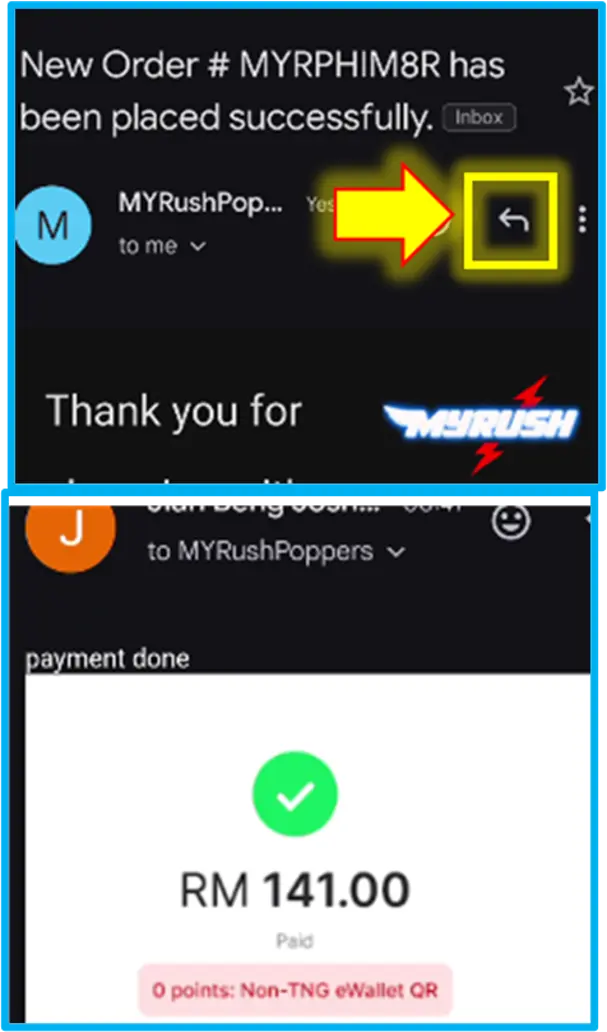
Step 6
Complete your payment and reply to the email with a screenshot of your payment receipt.
Selesaikan pembayaran anda dan balas emel tersebut dengan tangkapan skrin resit pembayaran.
完成付款后,请回复该电子邮件并附上付款凭证截图。
Step 7
Once we receive your payment and confirmation, we will send you a confirmation email. You will receive a tracking number with a tracking link after we arrange shipment with the courier.
Setelah kami menerima pembayaran dan pengesahan, kami akan menghantar emel pengesahan. Anda akan menerima nombor penjejakan dengan pautan selepas kami uruskan penghantaran dengan kurier.
一旦收到付款及确认,我们会发送 确认邮件. 安排快递发货后,您将收到包含追踪链接的追踪号码。

MYRUSHSPOPPERS™ MALAYSIA
100% Authentic | Fast Delivery | Discreet Packaging
QUICK LINKS
SHOP NOW
BUSINESS HOURS
Mon - Fri 11.00 - 23.00
Saturday 13.00 - 16.00
Sunday Closed
Public Holiday Closed
SAFETY NOTICE
All items are sold strictly as leather cleaners / room odorizers.
They are NOT designed for direct inhalation.